
Data Types in Java

 Data Types in Java 

Data type: 

 Data type indicates the different sizes and various values that can be stored in the variable. 

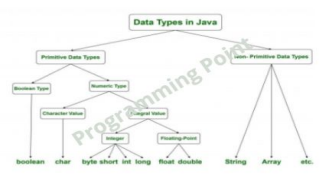
Types of data types in Java 

1.Primitive data types 

2.Non-primitive data types 

 Java Primitive Data Types 

There are 8 types of primitive data types are as follows: 

★ boolean data type 

★ byte data type 

★ short data type 

★ char data type 

★ int data type 

★ long data type 

★ float data type 

★ double data type 

 Java Non-Primitive Data Types 

Non primitive data types are: 

★Struct 

★Array 

★Class
Program example to understand the datatypes in java 

class Datatype { 

public static void main(String[] args) { 

int a=23; 

float b=34.5f; 

long c=90l; 

byte d=78; 

double e=78.8; 

char f='A'; 

short x=56; 

System.out.println("Primitive Data Types:"); 

System.out.println("The value of int datatype is: "+a); 

System.out.println("The value of float data type is: "+b); 

System.out.println("The value of long data type is: "+c); 

System.out.println("The value of byte data type is: "+d); 

System.out.println("The value of double data type is: "+e); System.out.println("The value of char data type is: "+f); 

System.out.println("The value of short data type is: "+x); 

} 

} 

Output: 

Primitive Data Types: 

The value of int data type is: 23 

The value of float data type is: 34.5 

The value of long data type is: 90 

The value of byte data type is: 78 

The value of double data type is: 78.8 

The value of char data type is: A 

The value of short data type is: 56


Comments

Post a Comment

Popular posts from this blog

How to use container widget

In this lesson ,I talk to you about one of the most basic of concept of flutter Use all the time to design our applications.  This is a container widget. Now a container widget for those who have done a bit of web development or web design. It's like a div. This is a Layout Box. You can move it by placing it on the screen and then you give a child to  show images,text and some other propertis . My top tip ,whenever, you use new widget in flutter it start from documentation.  As I said you above,  the documentation was really good and  all  you have to do  to find it. We are going to Widget Catalogue then you will find it for                                         Flutter development   you can see that the team has sorted all the widgets based on their actions. And we've really seen some of those images and assets Layout section and other ...

Operators in Java

                           Operator:  Operator is a symbol which is used to perform an operation.  For Example: +,-,*,/,% etc.  There are different types of operators in java. Here we discuss the operators which are used in programming.  ★ Unary Operators  ★ Arithmetic Operators  ★ Shift Operator  ★ Logical Operator  ★ Relational Operator  ★ Assignment Operator  Program Examples to Understand the operators in java  Unary Operator Program  class unary {  public static void main(String[] args) {  int a=23;   long d=10l;   System.out.println(" Unary Operators ");   System.out.println("The value of prefix int is: "+ ++a);   System.out.println("The value of postfix int is: "+ a--);   System.out.println("The value of prefix long is: "+ --d);   System.out.println("The value of postfix long is: "+ ...

Column class

  Column class widget that displays  vertically its children. import "package:flutter/material.dart" ; void main () {  runApp( MyApp ()) ; } class MyApp extends StatelessWidget {   @override   Widget build (BuildContext context) {     // TODO: implement build     return MaterialApp (      home: Scaffold (        backgroundColor: Colors. teal ,         body: SafeArea (          child: Column (            children: <Widget>[               Icon (                Icons. star ,                 color: Colors. amber ,   ...